Skip to content
21-Day Beyond Beginner Animation Challenge
Transform from Beginner to Capable Animator in 21 Days
Stop spiraling through YouTube tutorials and putting your animation off for “someday.” Animate every day, level up fast, and finally start feeling like the animator you always dreamed of being.
- Animate consistently, instead of procrastinating
- Know exactly what to practice, and in what order
- Go from forever beginner to capable animator
21 lessons · Lifetime access · 60-day guarantee
Taught by Rusty Gray, senior animator (Digital Domain, MPC, Steamroller)
Credits include X-Men, Cinderella, Pixels and Oddbods · 1.6M views on YouTube
The YouTube Hamster Wheel
Still watching animation tutorials instead of animating?
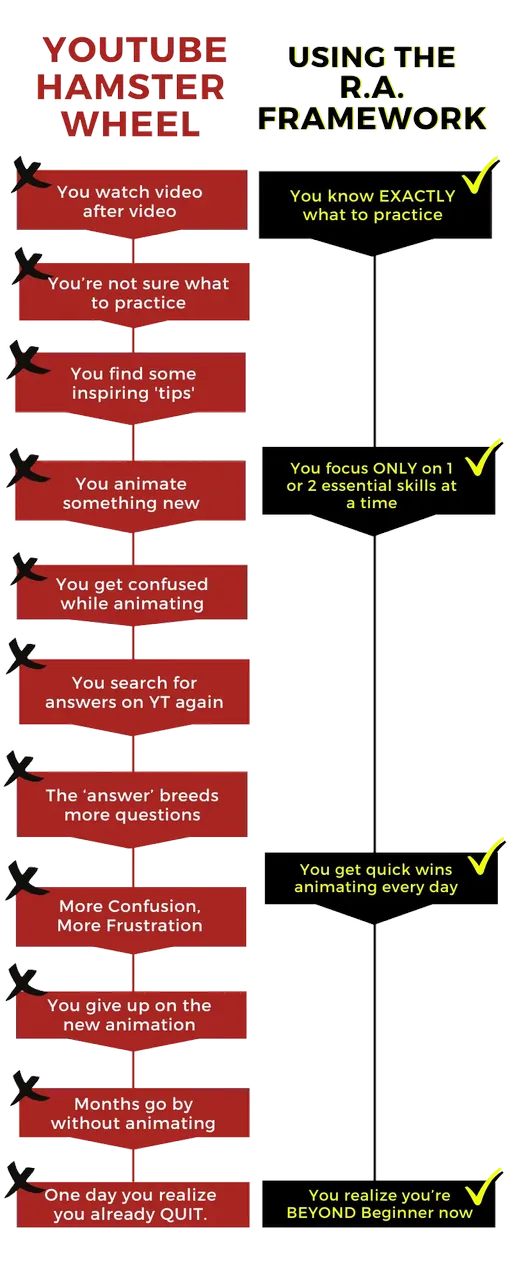
You’re not alone. Most new animators start on YouTube. And there’s soooo much free valuable knowledge out there -- how could it not be the answer?!
So you watch a tutorial. Then another. You get confused, search for answers, and every answer breeds more questions.
Then life gets busy, and that shot sits there for months.
When you finally open it back up, you can tell something’s off… you just can’t tell what. Is it the timing? The spacing? The poses? Am I just not talented enough?
I refer to this as the YouTube Hamster Wheel.
Animators tell me things like:
“I’ve watched so many tutorials and animated along with a few of them. But eventually I just stop. And I kinda forget to go back.”
“There’s so much you can learn from YouTube but its overwhelming to figure out where to start - let alone the next step.”
Nobody ever showed you what to practice, in what order, or how to spot what’s wrong. That’s what this challenge is built to fix.
So you can stop being a forever beginner or ball bounce only expert, and finally go beyond the basics.
The R.A. Framework
Here’s how you’ll get off the hamster wheel
The R.A. Framework (R.A. as in Rusty Animator) solves all 3 of your hamster wheel struggles. It’s a simple system:
- Know exactly what to practice (no more confusion)
- Focus ONLY on 1 or 2 essential skills at a time (no more scatterbrain)
- Spot what’s wrong, see why, and fix it, every single day (hello confidence & excitement!)
It’s a far better way to become a skilled animator. Look at the difference:
Don’t get me wrong, I love YouTube. It does a lot of good for animators. But it can’t give you a plan, or make sure you actually animate every day. That’s what this challenge is built for.
Here’s exactly how it works, every day:
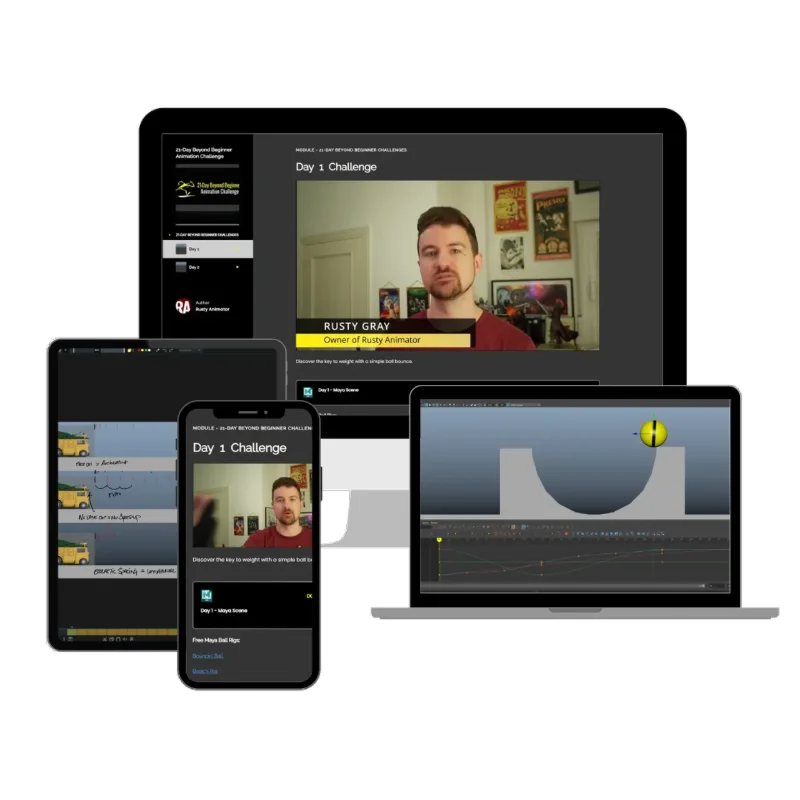
You’ll go through the same daily challenge loop:
- A 2 min email with that day’s challenge
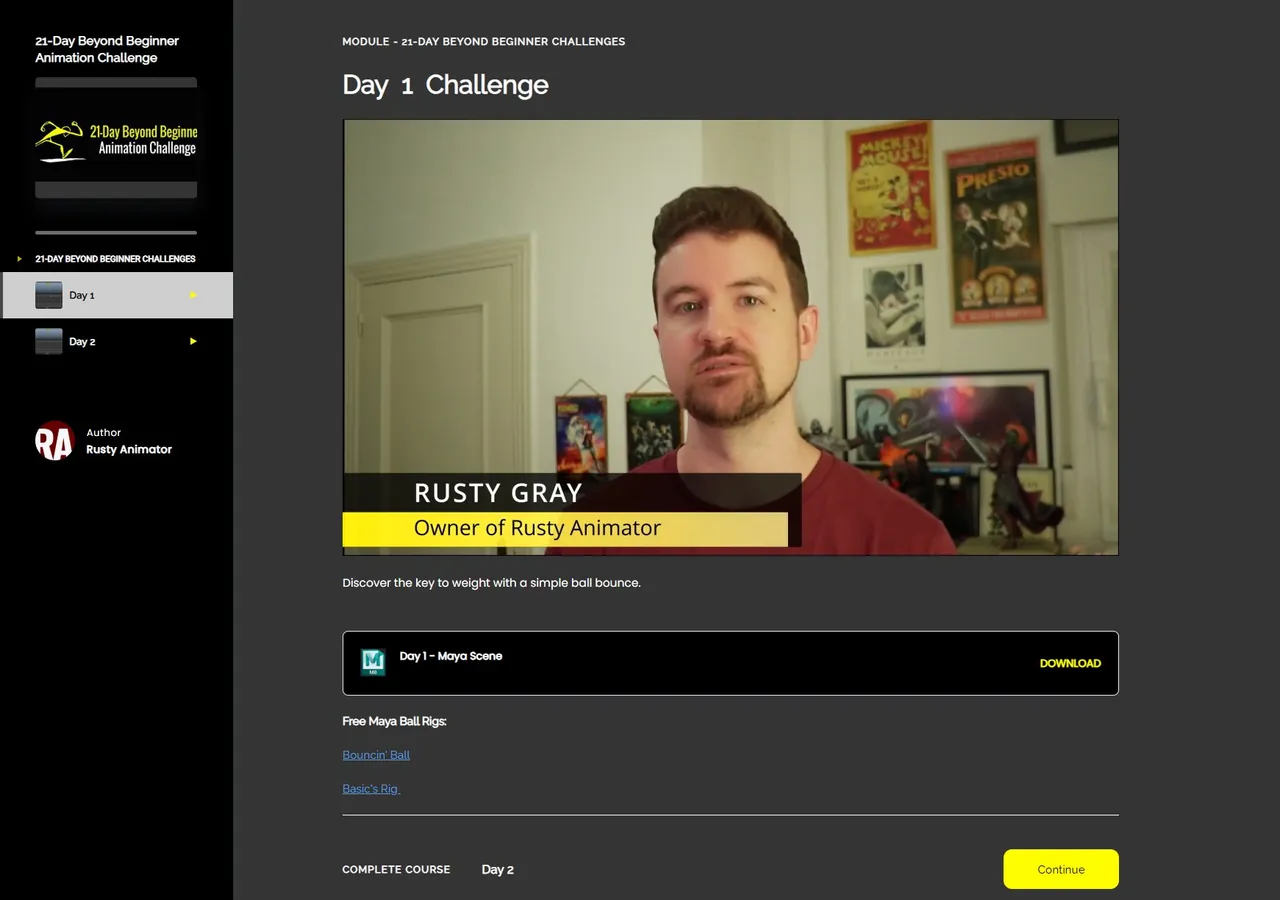
- A quick 5 min video where I show you a bad animation next to a good one, and exactly why one works and the other doesn’t
- A ready-to-go Maya scene with the intentionally bad animation, for you to fix
- A BIG daily level up
Daily 2 Min Email
Quick Challenge Video
Maya Scene Challenge
BIG Daily Lvl Up
About 30 minutes a day, and you jump straight into animating. The scene’s built, the rig’s loaded and the challenge is waiting. It’s self-paced too, so if life gets busy, just pick up where you left off.
And every day, you get a little better at the core animation skills every pro animator relies on.
Look at this animation.
Now look at this one.
Can you spot exactly why one of these is better than the other?
Most beginners can’t, and that’s totally normal. Even experienced animators may miss a couple of things.
But comparisons like this are really helpful. They let you see and feel the difference between a great animation and a bad one.
That’s why in every challenge, I’ll show you a bad animation and a good one, tell you which is which, and explain why.
Then you’ll dive in and create the difference yourself, by starting with the bad animation and making it good.
When you do that every day, you’ll start spotting these things in every animation you make from then on. So you’ll get far stronger in the skills you need if you want to become a professional animator.
I liked getting files with a “bad” animation to work on. It gave me a different perspective on how to look to those exercises.
 Saulo Botome, Senior Pro Animator
127 animators in 25+ countries have taken this challenge.
Here’s how you’ll level up in 21 days:
Day 1
Ball bounce
Many scoff at the vertical ball bounce and miss the key lessons it gives you about creating a feeling of weight.
Day 6
WALL-E
You’ll discover overlap and follow through, and keep building your sense of speed and momentum so characters feel organic.
Day 9
Squirrel hop
Squirrel hop combines your newly improved skills: weight, momentum and drag. It’s a challenge even for many new pros.
Days 11–12
Head turn
A natural looking head turn with eye blinks, an eye dart and facial animation. Few do it right. You’ll do it in one day.
Day 19
Foot roll
Avoid a shockingly common newbie pitfall by animating a foot pickup like a pro. Which is helpful, since you’ll likely animate feet a lot in your career.
Day 21
180° turn
Prove you’ve gone beyond beginner with a tricky 180° turn: weight shift, balance, hip rotation, foot placement, arcs and momentum. Mid-level body mechanics essentials.
See the 21-day path
The 21-day path
A sample of the daily challenges
- Day 1 With an overlooked ball animation, discover the keys to avoiding floaty, on-the-moon animations and create as much believable gravity as you need to make a character or object feel real.
- Day 2 Animate a Ninja Turtles van to truly grasp how timing and spacing affect speed.
- Day 4 Dynamic, expressive poses are the core of every appealing, entertaining animation. Find out how to squeeze every ounce of emotion and physicality from your poses with frequent quick pose tests throughout the challenge.
- Day 6 Animate WALL-E racing forward to unravel how eases, overshoots and overlap completely change how speed and impact feel.
- Day 8 Create a cat tail wiggle to test your overlap skills at a pro level, made easy with a 3-keyframe C and S curve formula.
- Days 11–12 Craft an extremely natural-looking head turn, then bring it to life with eye blinks, an eye dart and facial animation, by mastering a few fundamentals most beginners miss.
- Day 14 Tell an entertaining story with a simple character, using all the skills you’ve rapidly developed so far.
- Day 17 With a bipedal walk, discover the formula for how hips rotate. It applies to body mechanics in any animation, for your entire career, even without reference.
- Day 19 Avoid a shockingly common newbie pitfall by animating a foot pickup like a pro. Which is helpful, since you’ll likely animate feet a lot in your career.
- Day 21 Prove you’ve gone beyond beginner by animating a tricky 180° turn with flawless weight shift, balance, hip rotation, foot placement, arcs and momentum.
See the 7 bonus challenges
7 bonus challenges (Days 22-28)
Keep going beyond beginner after Day 21
- Day 22 An arm slam with real power.
- Day 23 A point with a hard accent.
- Day 24 A classic cartoon surprise take.
- Day 25 A box step.
- Day 26 A cartoony zip-off.
- Days 27-28 A 2-day robot story where you plan, block and polish your own shot.
- Plus The complete Maya for Animators quick training course, to make sure you know all the Maya essentials, even if you’ve never used Maya before. In as little as 2 weeks.
Now picture Day 21.
You look at all kinds of fundamentals and body mechanics now and see where the weight is off, the balance is off, and how it could be more appealing.
It’s like someone took the blindfold off.
And animating every day? That’s just what you do now.
You are now on the fast track to a pro-level demo reel.
I learned a new approach to animate the cat tail – the S and C shapes. Which is more effective and simpler than the approach I have learned in the past and I was using so far.
Saulo Botome, Senior Pro AnimatorYES, I level up skills, like - Slow in Slow out - Follow Through & Overlap (especially tail) - Poses (maintain Arcs, spaces) - Overshoot - Learn New approach
Still doing challenges as we speak
 Adam Guindon
Is this for you?
The kinds of animators this challenge is perfect for:
#1 - The Day 1 Beginner
If you’re completely new to animation and especially if you want to see if you enjoy it - this challenge is a perfect fit.
You’ll discover all the essentials and skip all of the fluff. Fluff that YouTube would definitely overwhelm you with.
With the 21 day beyond beginner challenge you’ll build a solid foundation right from the start and level up fast to taking on more advanced animations.
#2 - The Self Taught YouTuber
When the YouTube spiral has you spinning way too fast - from 1 random video to the next - it’s totally normal to feel lost on exactly where you’re at in your journey.
- What should you be animating and in what order?
- What skills should you be practicing and what’s the best way?
- Where is your skill level at exactly?
- Does this apply to a game, tv, feature, or vfx animator?
- How long will it take you to get the first job?
Unfortunately, some of the MOST important skills to discover as a beginner or the right strategies for success are not the kind of videos that get uploaded. Because they’re not especially ‘cool’ or ‘viral content’.
#3 - The On-and-Off Animator
You love animation. But you only seem to animate a couple of times a year.
You start a shot, life gets busy, and when you finally come back… you’re starting from the beginning all over again.
The challenge gives you 1 bite-size challenge a day, about 30 minutes, with everything set up and ready to go. So 21 days from now, animating every day is just what you do.
“Established daily Animation practice -- I Love it !!!” … “It builds my Resilience and Self-Confidence”
#4 - The Working Animator Who Wants a Refresher
Maybe you’re already working in the industry. Or maybe you’ve drifted into lighting, modeling or rigging, and your animation has gotten a bit rusty.
The challenge is designed mainly for beginners, but junior and veteran pros have used it as a quick refresher on the fundamentals they rely on every day.
I’m more productive and more consistent for sure.
Saulo Botome, Senior Pro Animator
My story
Why I created the 21-Day Beyond Beginner Animation Challenge
Hi, I’m Rusty.
I graduated university as valedictorian. And I spent over $100,000 on that degree.
It resulted in zero job offers. Just crickets.
I was far from the capable animator I thought I’d be. And I realized I’d spent very little of those years actually animating. I wasn’t learning from pros in the industry, and I didn’t have a clear structure for building the skills I needed, in the right order.
So I paid around $18,000 more for an online animation school. Some of my mentors were amazing. Others almost made me quit. And by graduation, I wondered again if I was even capable of getting a job.
To my surprise, I did get there. I spent 5+ years animating at studios big and small, like Digital Domain, MPC, Steamroller and One Animation, on movies like X-Men, Cinderella and Pixels.
But I never forgot how hard - and how expensive - it was to get those skills. Or how much easier it could have been if someone had shown me exactly what to practice, in what order, why each skill mattered, and how to build it.
That’s why I’ve spent the last 10+ years mentoring animators.
I’ve watched students who’d been stuck for years finally get hired at studios like MPC, Sony, Cinesite and Double Negative, plus smaller studios doing really cool work. One student even moved from Brazil to Japan to animate full-time, and paid his mom’s bills for a while to pay her back for everything she’d done for him.
My YouTube tutorials have been watched 1.6 million times. But I learned the hard way that tutorials alone don’t keep most people animating.
When I made a free 28 Day Animation Challenge on YouTube, each video ran 1 to 2 hours. And I noticed most people dropped off after just a couple of days.
I hit pause halfway through, at Day 14. Burnt out after making 28+ hours of tutorial walkthroughs, and doubting this whole idea.
So I rebuilt it from the ground up, to actually be bite-size this time. Something that would help anyone build the habit of animating, because you’d only need about 30 minutes a day, focused on one or two skills at a time.
Everything I wish I’d had when I started.
Honestly, if I could go back to when I was just starting out - knowing what I know now - I would easily have joined this challenge instead of going to college.
That’s the 21-Day Beyond Beginner Animation Challenge.
Senior animator, 5+ years in VFX and game studios · Mentoring animators for 10+ years · Credits include X-Men, Cinderella and Pixels · Owner, Rusty Animator School
Studio experience
MPCDigital DomainOne AnimationSteamroller
Join today
Here’s what you get when you join today:
- Full LIFETIME access to 21 career changing animation challenge lessons ($300 value)
- 7 bonus challenges plus the Maya for Animators quick training course ($100 value)
- Constant improvement with daily reminder emails, bite size challenges, and ready to go Maya scenes ($100 value)
- Access to our private Discord to share your work, get peer feedback and stay accountable
- Access to all future challenge updates and additions
Total Value: $500 $29
Yours today for only: $29
21 days from now, you’ll either have 21 finished challenges and a daily animating habit…
Or that same shot will still be sitting there.
It’s $29, and you’ve got 60 days to change your mind.
$29 One-time payment - Lifetime Access

100% MONEY BACK GUARANTEE
It’s Backed by a 60-Day Money Back Guarantee
I’m so confident that this will significantly improve your animation skills and get you consistently animating that you get 60 days to see results or it’s free!
No questions asked.
Just email me at rusty@rustyanimator.com within 60 days and you’ll get a full refund.
Out of 109 purchases, only 3 people have ever asked for a refund.
Student results
Where these skills can take you: students from Rusty Animator School
“After Rusty helped me land my first animation job, I found my skill level was at a higher level than the lead animator at the studio. I was able to finish animations faster, had them looking more appealing, and talk about the animation style better with the creative director. I blame you Rusty. You did it with the challenging animations we had in Rusty Animator School. Without you Rusty I wouldn’t have made it and gotten hired, so thank you for everything! You’re awesome!”
Xavier RobertsonRAS student · Landed their first job
“I’ve learned from you more than I have from any other individual instructor. Rusty is here to see you through it, he honestly cares whether we get better or not, and I think he comes across that way immediately. I put my reel out on a Friday and I got an email on Monday for a Wednesday interview. Wednesday I got the job. And that’s my story.”

Theron ChaplinRAS student · Landed their first job
“I used to rely on reference so much. Which makes sense, but the problem is I would just copy the reference. And with your course you really pushed me to push my poses and get more fluidity and get looser with my animation, which improved sooo much! Like I remember with the ice skater… that was the moment I realized, oh my god yes, this is what animation is. You’re not just copying the reference, you’re pushing it, because that’s what gives it pizzazz. That’s what makes it look appealing and entertaining. It’s one of those things you know but you don’t realize. But the moment you realize it, it’s like “OMG, I found the secret!”

Chanthi VijayapalaRAS student · Landed their first job
“If I had gone to another school instead of Rusty Animator School I wouldn’t have had the structure, the focus on body mechanics, and all the things that really matter. And what made me keep coming back to you is that I saw that you respected the craft. That you knew what mattered the most at each step of the way. I’ve seen other people trying to make shots that weren’t the best for them at the moment, the best for them to grow. And I knew that every term I took with you at Rusty Animator School, each shot would be the best thing for me right now to grow the most.”
Smith RamoneRAS student · Landed their first job
Student work



A few animations my School students have made



FAQ
Any questions?
How does the challenge work?
Unlike most courses, this challenge is not designed to hit you over the head with hundreds of hours of video or an overwhelming curriculum. When you join, you get one short video every day for 21 days. Each bite-size lesson contains an exercise you can learn in about 30 minutes, so every day you know exactly what you’re doing to meaningfully improve. It gives you the quick wins you’ve been craving, so you’ll finally want to animate every day. You share your work and get feedback from other animators in our private Discord.
How long will I have access to the challenge?
For life. Even after the 21 days, you keep access to everything, so you can keep improving. I’d recommend going through it more than once; you’ll get new insights and level-ups every time.
How much time will this take?
About 30 minutes a day, watching and animating that day’s challenge. You can start any day, and it’s self-paced, so if life gets busy you just pick up where you left off. None of us have time; we make time for what matters, and almost anyone can find 30 minutes a day.
How good can I actually get in 21 days?
Let’s be clear: it won’t make you a professional working animator or hand you a finished demo reel in 21 days. Anyone promising that is likely trying to scam you. What it will give you is the best possible start (or restart) for your animation: a daily animating habit, believable weight, impact, fluid motion and appeal, the same workflow and tools as the pros, and a foundation solid enough to take on more advanced shots afterward.
What software is required?
Maya isn’t required. The challenge scenes are Maya files and the demos use Maya, so Maya applies most directly. But the skills carry over to Blender, 2D or any tool: timing and spacing, dynamic poses, believable weight. If you don’t have Maya, Blender is free and a perfectly suitable alternative.
What if it’s not for me?
You’re covered by the 60-day money back guarantee. Just email me at rusty@rustyanimator.com within 60 days for a full refund. No questions asked.
Ready to go beyond beginner?
ONLY $29One-time payment · Lifetime access · 60-day guarantee · 21 animation exercises